


Tired of re-explaining your business requirements every time you chat with AI? Discover how Claude Skills can permanently encode your professional workflows and turn your AI into a specialized digital employee.
The Problem with Traditional AI Prompting
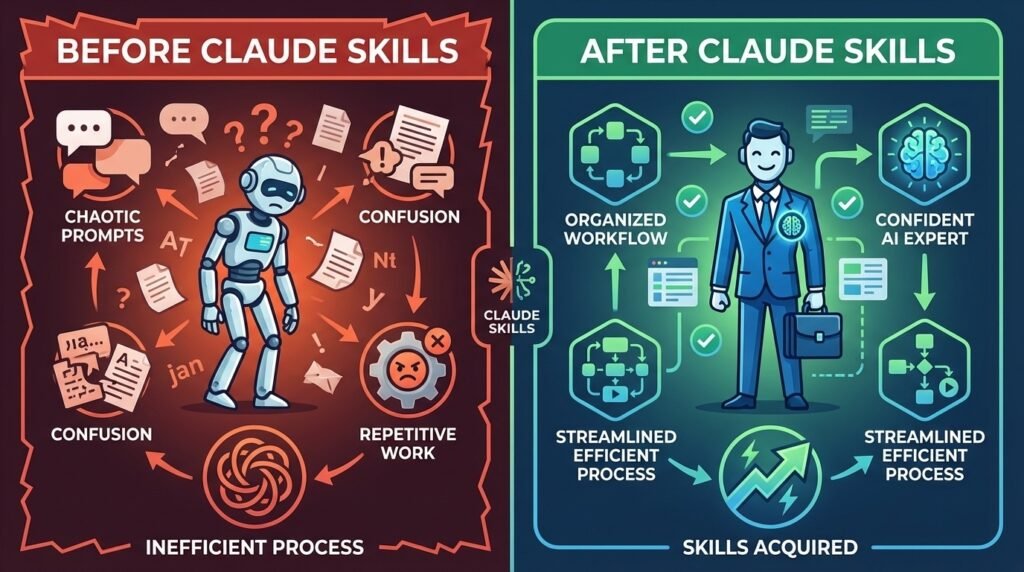
We’ve all been there. You spend 20 minutes crafting the perfect prompt, Claude delivers excellent results, and then… you close the chat. Tomorrow, you’re back to square one, re-explaining everything from scratch. Your AI has amnesia, and you’re stuck in an endless loop of repetitive instruction.
What if your AI could remember your business frameworks, quality standards, and expert workflows permanently? What if it could think like a seasoned practitioner in your industry rather than just following basic instructions?
That’s exactly what Claude Skills delivers.
Before/After Comparison – Shows chaotic prompts vs organized workflow
What Are Claude Skills? The Digital Employee You’ve Been Waiting For
Claude Skills represent a fundamental shift in how we interact with AI—moving from temporary, one-off prompting to permanent, domain-specific expertise. Think of Skills not as simple instructions, but as specialized digital employees that store your industry frameworks, scoring systems, and quality checklists to ensure consistent, high-value output across every interaction.
The Professional’s Briefcase Analogy
Imagine a Claude Skill as a seasoned professional’s briefcase:
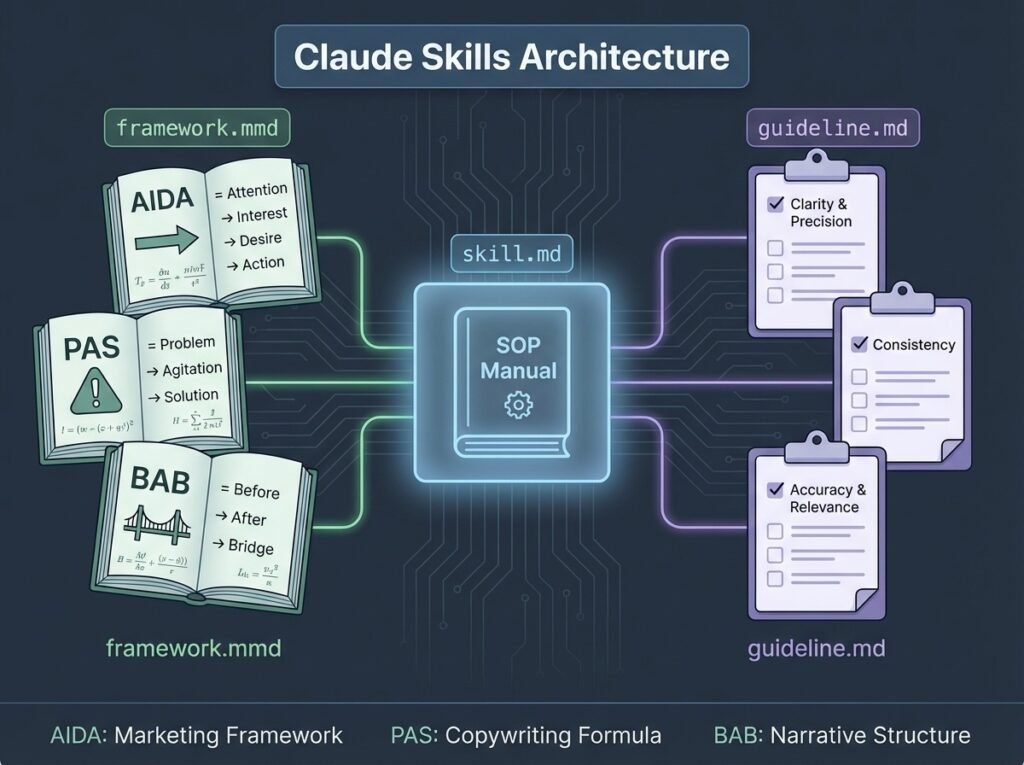
- The skill.md file is their “Standard Operating Procedure” manual sitting at the top
- Framework files are the “textbooks” of core theory they’ve mastered (AIDA, PAS, BAB frameworks)
- Guideline files are the “checklists” ensuring every small detail meets your specific quality standards
When you activate a Skill, you’re not just uploading documents—you’re onboarding an expert who deeply understands your business’s unique operational standards.
[INSERT IMAGE 2: Hero Image – Digital briefcase opening with AI elements]
The Architecture: How Claude Skills Actually Work
Why Markdown? The Smart Choice for Human-AI Collaboration
Claude Skills are architected using markdown files (typically .md or .mmd extensions) because they strike the perfect balance: simple enough for humans to understand, yet highly effective for AI interpretation. Anthropic selected this format intentionally to keep Skills accessible to non-technical users while maintaining powerful functionality.
The Three-File Structure of Expert AI
A complete Claude Skill consists of three distinct file types, eventually bundled into a single .skill file:
Architecture Diagram – Three file types with labels
1. skill.md: Your Standard Operating Procedure
This primary file contains:
- Step-by-step review workflows
- Scoring systems for quality assessment
- Output templates the AI must follow
- Professional criteria for evaluations
2. Framework Files (.mmd): Your Theoretical Textbooks
These store core industry formulas and models:
- AIDA (Attention, Interest, Desire, Action) for copywriting
- PAS (Problem, Agitation, Solution) for persuasive content
- BAB (Before, After, Bridge) for transformation narratives
- Custom frameworks specific to your industry
3. Guideline Files (.md): Your Quality Checklists
Detailed best practices for individual elements:
- Specific rules for headlines that convert
- Pricing page optimization standards
- Call-to-action effectiveness criteria
- Brand voice consistency guidelines
From Step-Following to Expert Thinking
This architecture is deliberately designed to move AI away from mechanical “step following” toward genuine “expert thinking.” By encoding these structured files, you enable Claude to deliver scored assessments with specific “before and after” suggestions, complete with psychological rationale—just like a human expert would.
Getting Started: Your Step-by-Step Activation Guide
Workspace Setup – Claude interface with settings visible

Step 1: Enable the Skills Preview Feature
The Skills feature isn’t enabled by default—you’ll need to activate it manually:
- Navigate to Settings in your Claude interface
- Click the Capabilities tab
- Scroll down to find the Skills Preview feature
- Toggle it on
Once activated, you’ll unlock the ability to create customizable instructions that Claude follows consistently across all chats—transforming it from a general assistant into a suite of specialized tools.
Step 2: Choose Your Implementation Method
After enabling Skills, you’ll see three powerful options for adding expertise to your AI:
Three Methods – Create, Write, Upload panels
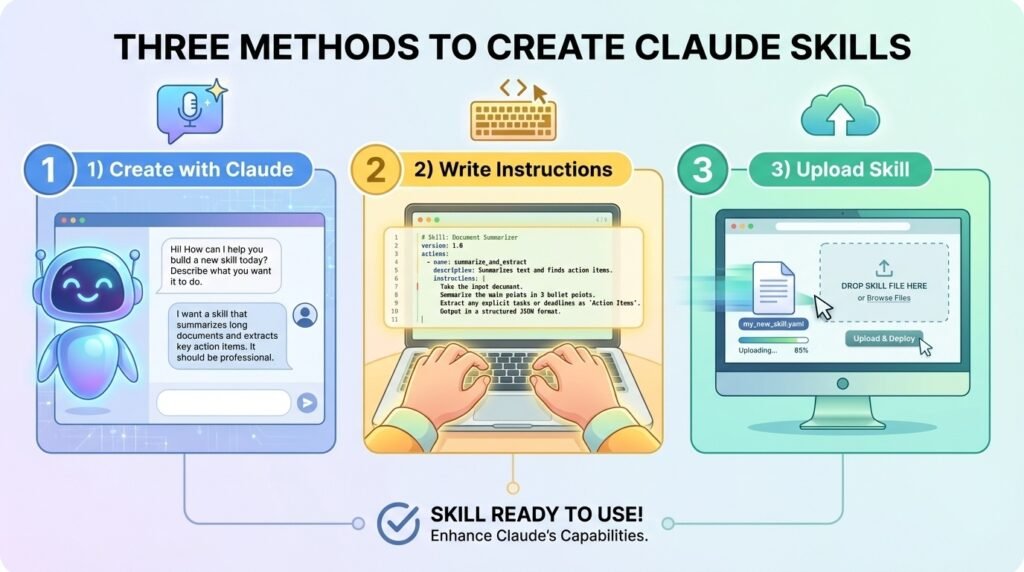
Option 1: Create with Claude (Conversational Approach) ✨ RECOMMENDED
This interactive “Skill Creator” process is ideal for complex workflows:
- Claude acts as your onboarding specialist, asking clarifying questions
- You describe your business context and specific needs
- Claude synthesizes this information into a comprehensive skill structure
- Best for: Complex, multi-step workflows requiring nuanced understanding
Example conversation:
- Claude: “What type of work will this skill support?”
- You: “I run a design agency and need conversion-focused copywriting reviews”
- Claude: “What scoring criteria should I use?”
- You: “Rate headlines, emotional triggers, clarity, and call-to-action effectiveness on a 1-10 scale”
Option 2: Write Skill Instructions (Direct Approach) ⚡
Perfect for straightforward skills that are easy to describe:
- Input your instructions directly into the interface
- Immediate setup without guided conversation
- Best for: Simple, clearly-defined tasks with minimal complexity
Option 3: Upload a Skill (Structured Approach) 📁
Import pre-existing .skill or .zip files:
- Essential for sharing specialized workflows with your team
- Perfect for implementing expert frameworks you’ve already developed
- Simply drag and drop your bundled files
- Best for: Complex, pre-coded expert systems or industry-specific frameworks
Skills vs. Projects: Why This Changes Everything
Understanding the distinction between Claude Skills and Projects is crucial for maximizing your AI investment.
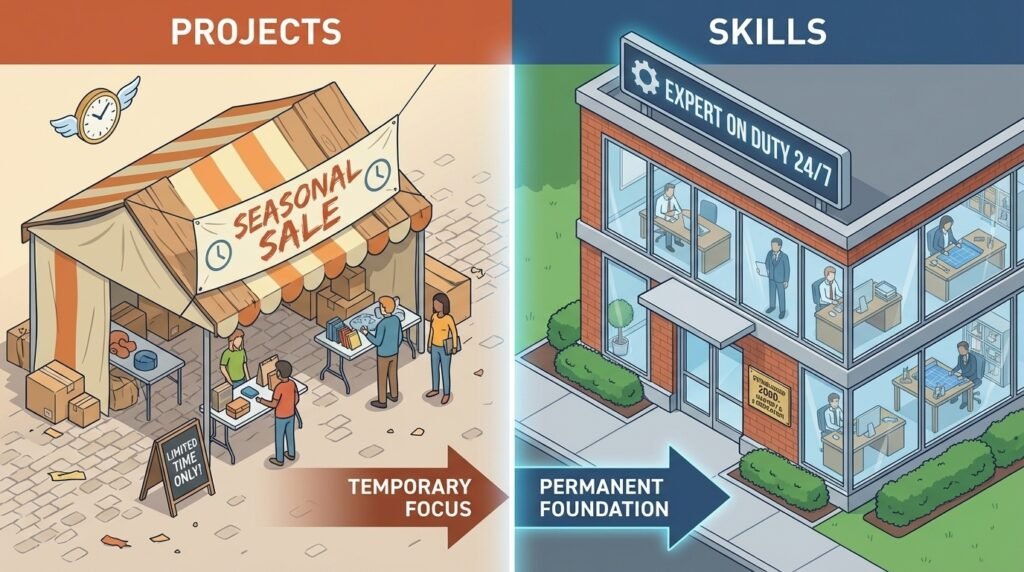
Projects vs Skills – Pop-up shop vs permanent office
The Seasonal Pop-Up vs. Permanent Specialist
Think of Projects as seasonal pop-up shops—perfectly equipped for specific campaigns (like Christmas or Valentine’s Day promotions), but dismantled once the event ends. They have a clear beginning, middle, and end.
Skills are permanent specialist employees in your head office. They’ve mastered your company’s playbooks and are available to apply that deep expertise to every task, year-round, across every new conversation.
The Five Critical Advantages of Skills
1. Operational Continuity vs. Task Specificity
- Projects: Context-specific, finite, campaign-bound
- Skills: Built for ongoing day-to-day operations, work consistently across any chat
2. Deep Business Context
- Projects: May require re-explaining goals in each session
- Skills: Claude “knows” your business and procedures from the start, preventing context loss
3. Embedded Expert Frameworks
- Projects: May contain various files, but lack structured expertise
- Skills: Automatically load specialized frameworks and provide scored assessments with professional rationale (not generic advice like “make it sound fresh”)
4. Iterative Evolution
- Projects: Typically static for the duration of the campaign
- Skills: Designed to be refined over time, continuously improving like an employee learning your preferences
5. Expert Thinking Over Step Following
- Projects: Follow instructions mechanically
- Skills: Think like practitioners, prioritizing high-impact fixes with professional reasoning
Creating High-Value Skills: The 10-Step Mastery Process
The true power of Claude Skills emerges when you move beyond basic instruction-following to genuine expert thinking. Here’s the strategic approach:
10-Step Process – Circular workflow diagram]
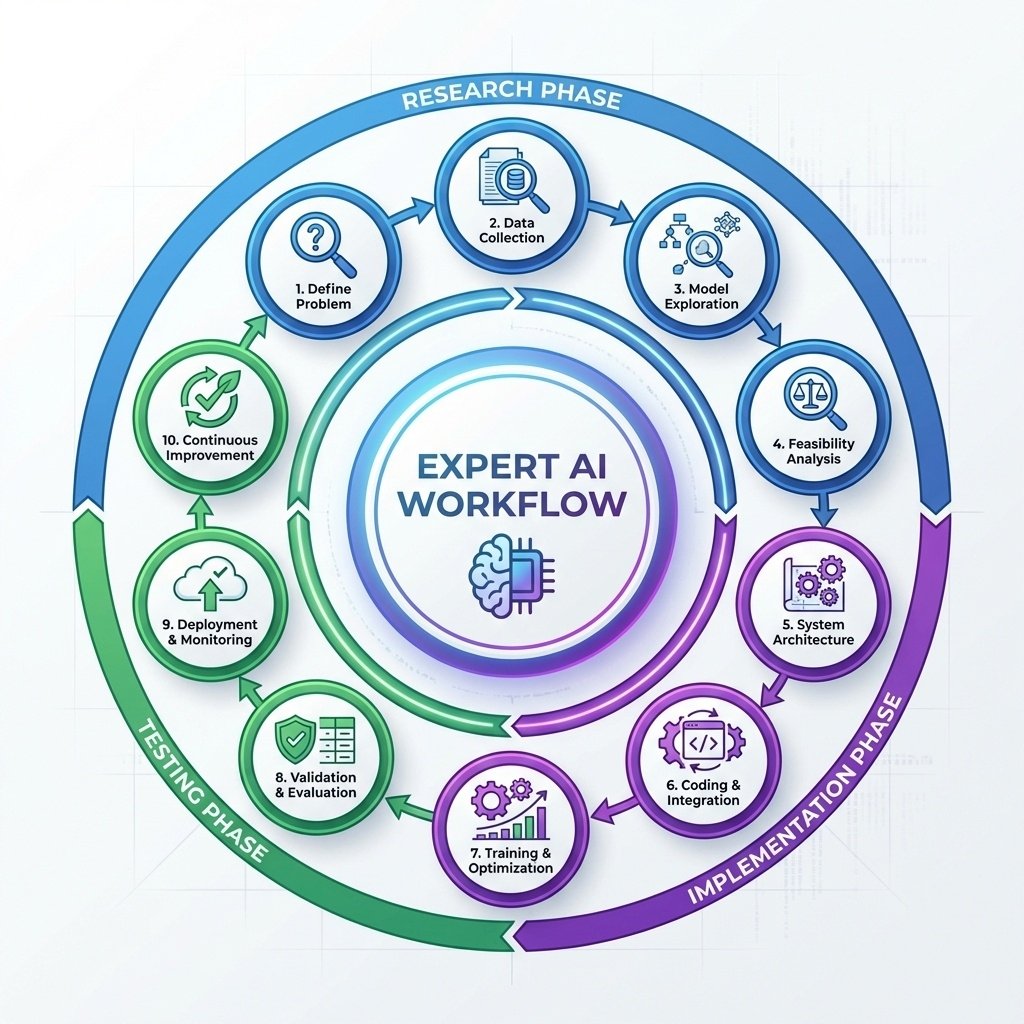
Phase 1: Research and Foundation (Steps 1-3)
1. Deep Domain Research
Go beyond surface-level understanding. Study industry best practices, analyze successful examples, and synthesize core principles that drive results in your field.
2. Framework Integration
Identify the theoretical models that professionals in your domain use. For copywriting, this might be AIDA, PAS, and BAB. For UX design, it could be Jakob’s Law, Hick’s Law, and Fitts’s Law.
3. Quality Standards Definition
Document the specific criteria that separate excellent work from mediocre output in your domain. Be ruthlessly specific.
Phase 2: Structure and Implementation (Steps 4-6)
4. Workflow Architecture
Design the step-by-step process your Skill will follow. Each section must “earn its place” by contributing to high-value output.
5. Scoring System Development
Create objective assessment criteria. Scored assessments transform vague feedback (“make it better”) into actionable improvements with measurable impact.
6. Template Creation
Build output templates that ensure consistent formatting and comprehensive coverage of all critical elements.
Phase 3: Testing and Refinement (Steps 7-10)
7. Real-World Testing
Apply your Skill to actual work scenarios. Does it perform like an expert, or just follow steps mechanically?
8. Self-Critique Against Quality Criteria
Review outputs objectively. Where does the AI’s reasoning fall short? What gaps exist in the logic?
9. Iterative Refinement
Fix identified gaps, add new research insights, and enhance the Skill’s ability to think like a practitioner.
10. Continuous Evolution
Skills aren’t “finished”—they evolve as your business needs change and as you discover new best practices.
The “Ruthless Constraint” Principle
Every element in your Skill must justify its existence. Avoid bloat. Focus on components that directly contribute to expert-level output. This constraint forces clarity and ensures your Skill remains powerful and efficient.
Real-World Application: The Conversion Copywriting Skill Example
Let’s see how this works in practice with a conversion-focused copywriting reviewer:
The Context
You run a design agency and frequently need to review mobile app copy for conversion optimization. Instead of analyzing each project from scratch, you create a Skill.
The Implementation
skill.md contains:
- A 5-step review workflow (Headline Impact → Emotional Triggers → Clarity → Urgency → CTA Effectiveness)
- Scoring system (1-10 for each element)
- Output template with “Before,” “After,” and “Why This Works” sections
Framework files include:
- AIDA copywriting framework
- PAS formula for pain-point messaging
- Psychological triggers reference guide
Guideline files specify:
- Headline best practices (clarity over cleverness)
- Pricing page optimization rules
- CTA button psychology and placement standards
The Result
When you upload a screenshot of mobile app copy, Claude:
- Analyzes it against professional conversion frameworks
- Provides scored assessments (e.g., “Headline: 6/10 – Clear benefit but lacks emotional hook”)
- Delivers specific before-and-after suggestions
- Explains the psychological rationale for each recommendation
- Prioritizes fixes by potential conversion impact
This isn’t generic advice—it’s expert-level consulting, available instantly, every time.
Management and Continuous Improvement
Skills Are Living Documents
Unlike static prompts, Skills are designed for ongoing refinement. Return to your Settings → Capabilities tab to:
- Edit existing Skills based on output quality
- Add new research as you discover better practices
- Fix logical gaps identified through real-world use
- Expand frameworks as your business evolves
The Onboarding Metaphor
Think of Skill management like onboarding a new specialist employee. Initially, they might miss nuances of your business. Through iterative feedback and refinement, they learn your preferences intuitively, eventually delighting you by anticipating needs before you articulate them.
The Strategic Value Proposition
Why Claude Skills Matter for Your Business
Traditional AI Approach:
- ❌ Repeat instructions in every chat
- ❌ Inconsistent quality across sessions
- ❌ Generic, surface-level suggestions
- ❌ No accumulation of business knowledge
- ❌ Lose context frequently
Claude Skills Approach:
- ✅ Set expertise once, use forever
- ✅ Consistent, professional-grade output
- ✅ Specific, actionable recommendations with rationale
- ✅ Permanent repository of your frameworks and standards
- ✅ Deep business context retained across all conversations
The ROI of Permanent Expertise
ROI Visualization – Time savings comparison]
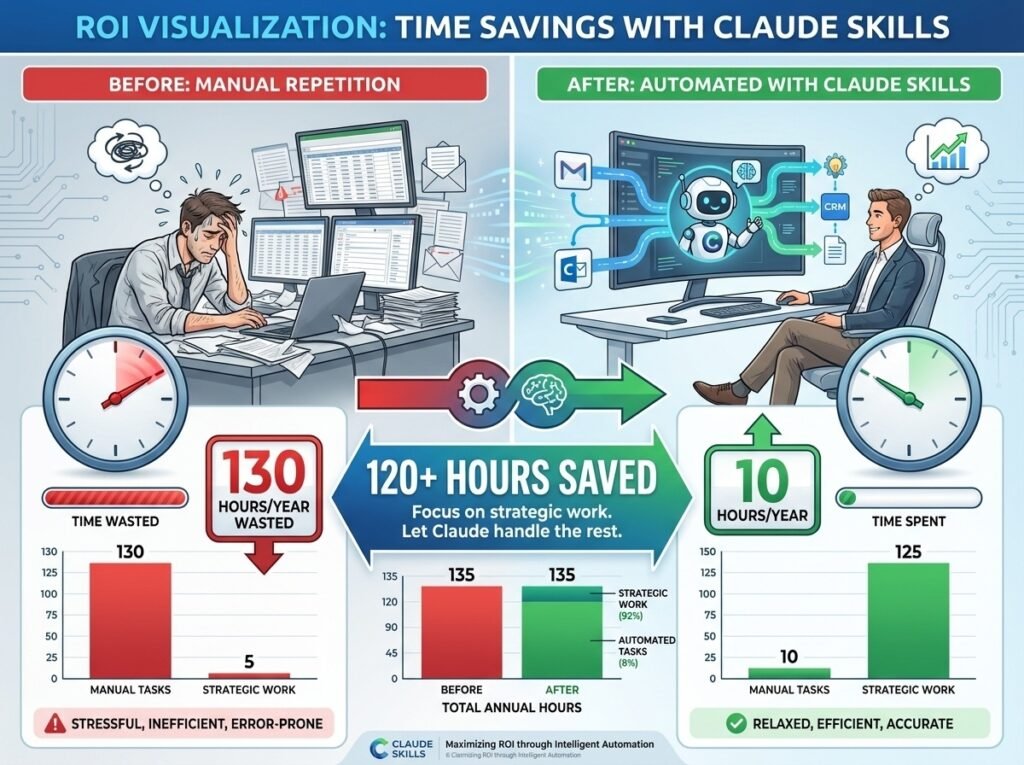
Consider the time saved:
- Without Skills: 15 minutes per chat explaining context × 10 chats/week = 2.5 hours/week = 130 hours/year
- With Skills: Setup time (2-4 hours) + occasional refinement (30 minutes/month) = ~10 hours/year
That’s 120+ hours saved annually, with dramatically higher output quality.
Advanced Pro Tips for Power Users
1. Start with Your Most Repetitive Tasks
Your first Skill should address work you do frequently. The ROI is immediate and the learning curve pays dividends quickly.
2. Build a Skill Library for Your Team
Upload and share .skill files across your organization. When everyone uses the same expert frameworks, quality becomes consistent and scalable.
3. Version Control Your Skills
As you refine Skills, save previous versions. Sometimes a change that works for one use case diminishes performance for another.
4. Combine Skills Strategically
You can activate multiple Skills simultaneously. A content creator might use “SEO Optimization” + “Brand Voice Consistency” + “Conversion Copywriting” Skills together.
5. Document Your Iteration Process
Keep notes on what changes improved output and why. This meta-knowledge accelerates future Skill development.
Common Pitfalls to Avoid
❌ Mistake 1: Making Skills Too Generic
The Problem: Trying to create one “master Skill” for everything
The Solution: Build focused, domain-specific Skills that excel at particular tasks
❌ Mistake 2: Overcomplicating Initial Versions
The Problem: Trying to perfect a Skill before testing it
The Solution: Start with a functional MVP, then iterate based on real-world performance
❌ Mistake 3: Treating Skills as Static
The Problem: Creating a Skill and never refining it
The Solution: Schedule quarterly reviews to incorporate new learnings and research
❌ Mistake 4: Neglecting the “Why”
The Problem: Including rules without explaining the reasoning
The Solution: Document the psychological or business rationale behind each guideline—it makes the AI’s thinking more sophisticated
❌ Mistake 5: Forgetting to Test with Edge Cases
The Problem: Skills that work for common scenarios but break with unusual inputs
The Solution: Include edge case handling and fallback logic in your workflow
The Future of AI Work: From Tools to Team Members
Claude Skills represent more than a feature update—they signal a fundamental shift in how we should think about AI in professional contexts.
We’re moving from:
- Tools we use → Specialists we employ
- One-off assistance → Permanent expertise
- Generic capabilities → Domain mastery
- Forgettable interactions → Accumulated knowledge
The businesses that thrive in the AI era won’t be those that use AI most frequently, but those that encode their expertise most effectively. Claude Skills provides the architecture to do exactly that.
Your Action Plan: Getting Started This Week
Day 1-2: Enable and Explore
- Activate the Skills preview feature in your settings
- Familiarize yourself with the three implementation methods
- Identify your most repetitive, expertise-heavy task
Day 3-4: Create Your First Skill
- Use “Create with Claude” for your initial Skill
- Focus on clear workflow steps and specific quality criteria
- Test with 3-5 real-world examples
Day 5: Refine and Document
- Analyze the output quality
- Identify gaps in reasoning or missed opportunities
- Edit your Skill to address these issues
- Document what improved and why
Week 2 and Beyond: Build Your Expert AI Team
- Create 2-3 additional Skills for different domains
- Share successful Skills with team members
- Establish a refinement schedule
- Measure time savings and quality improvements
The Bottom Line
Claude Skills transforms AI from a forgetful assistant into a permanent, expert-level team member that understands your business frameworks, quality standards, and operational procedures. By encoding professional workflows into structured markdown files, you create digital specialists that think like practitioners—delivering consistent, high-value output across every interaction.
The setup requires initial investment, but the return is profound: hours saved weekly, dramatically improved consistency, and AI that finally “gets” your business without constant re-explanation.
The question isn’t whether to adopt Claude Skills—it’s how quickly you can encode your expertise and start reaping the benefits.
Ready to transform your AI from a temporary tool into a permanent expert? Head to your Claude settings, enable the Skills preview, and start building your specialized digital team today.
What expertise will you encode first? Share your Claude Skills journey in the comments below—we’d love to hear which workflows you’re permanently upgrading.
Leave a Reply
You must be logged in to post a comment.